Another experimental video using Mandelbulber 3D v2.
A more colourful, complex shape.
Video made from 360 rendered stills which took 6.5 hrs to create.
Some in the middle of the animation sequence went a bit haywire so were omitted.
I noticed that the still background was rendered fresh every time which added to the time taken.
The close zoomed section ended up faster than I wanted.
Lots of learning to do regarding choosing where to put keyframes for a smooth flight.

Showing posts with label animation. Show all posts
Showing posts with label animation. Show all posts
Monday, 8 July 2019


Sunday, 7 July 2019
Mandel Flight
Inspired by Adrian (Adrian's Images) when he posted some animations and following a link he sent me I found Mandelbulber 3D for Mac. This app draws 3D representations of Mandlebrots. This is my first attempt in making a video with it using one of the 3D 'shapes' included in the app.
It took about 34 minutes to render 198 png images. First I tried importing them in iMovie but for some unfathomable reason it reversed the animation direction of every other image. Next I tried VideoPad which reversed the order they played. Anyway I saved that as an mp4 then imported that movie in iMovie and reversed the direction of play, added sound and created the finished video.
It took about 34 minutes to render 198 png images. First I tried importing them in iMovie but for some unfathomable reason it reversed the animation direction of every other image. Next I tried VideoPad which reversed the order they played. Anyway I saved that as an mp4 then imported that movie in iMovie and reversed the direction of play, added sound and created the finished video.
Sunday, 7 October 2018
First Attempt with Blender on Ubuntu
Having seen the marvellous things Adrian (Adrian's Images) achieves with Blender and other 3D graphics programs it inspired me to take the plunge and install Blender on my new (refurbished) desktop PC.
It is a steep learning curve but fortunately the Blender user community is large, nay vast, so a quick Google ( as Doddy used to say - They can't touch you for it) can usually throw up several helpful, detailed help files and videos.
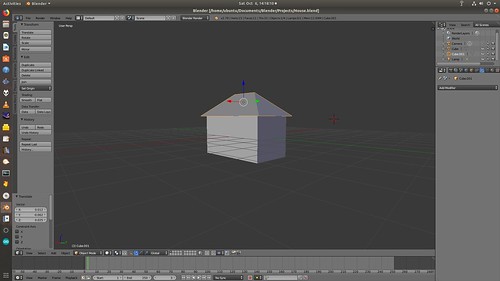
My first simple 3D house shape
... with a bit more detail and a first attempt at rendering a video
This should keep me off the streets and out of mischief for hours during the coming long, dark evenings.
It is a steep learning curve but fortunately the Blender user community is large, nay vast, so a quick Google ( as Doddy used to say - They can't touch you for it) can usually throw up several helpful, detailed help files and videos.
My first simple 3D house shape
... with a bit more detail and a first attempt at rendering a video
This should keep me off the streets and out of mischief for hours during the coming long, dark evenings.
Sunday, 2 June 2013
Squirlz
I was removing a couple of programs from the PC. Looking through the long list of those I had installed I spotted the name Squirlz. Whatever is that? I thought. It had been on the machine, unused, for so long I had quite forgotten what it did. I ended up having to Google it to see. Aha! - a free morphing program. (Squirlz Morph) I don't remember ever trying it out so decided to have a go.
One way to use it is to load two or more pictures and let the program morph between them. On a quick search I settled on two photos of the Great Spotted Woodpecker. The program can attempt to morph without any further help and did a fair job with these two but it does better if control points are placed on both pictures. They are placed on one and the program puts copies in the same place on the other. Then you move those on the second photo so they are on the same features on both.

The control points are little circles so you may have to enlarge the picture to see them clearly.
Once checked on the rough animated preview there is a choice of saving the morphed animation as an animated GIF, an SWF file or an AVI movie file. I tried them all and the results were much the same. The main difference was file size. The first two made files between 11 and 14MB whereas for the .avi there is a choice of compression codecs. I chose mp4 which made a tidy 505KB movie file. Animated GIF and SWF files play the animation repeatedly whereas the AVI plays through once then stops.
Other choices before or during processing and saving are the number of frames and the frame rate. For this example I ended up using 300 frames and a rate of 20fps.
One way to use it is to load two or more pictures and let the program morph between them. On a quick search I settled on two photos of the Great Spotted Woodpecker. The program can attempt to morph without any further help and did a fair job with these two but it does better if control points are placed on both pictures. They are placed on one and the program puts copies in the same place on the other. Then you move those on the second photo so they are on the same features on both.
The control points are little circles so you may have to enlarge the picture to see them clearly.
Once checked on the rough animated preview there is a choice of saving the morphed animation as an animated GIF, an SWF file or an AVI movie file. I tried them all and the results were much the same. The main difference was file size. The first two made files between 11 and 14MB whereas for the .avi there is a choice of compression codecs. I chose mp4 which made a tidy 505KB movie file. Animated GIF and SWF files play the animation repeatedly whereas the AVI plays through once then stops.
Other choices before or during processing and saving are the number of frames and the frame rate. For this example I ended up using 300 frames and a rate of 20fps.
Subscribe to:
Posts (Atom)
